

Summary. A practical pre-holiday test plan for commerce teams that want AI assistants to find current products, explain the trade-offs, and hand shoppers back to a merchant-owned storefront.
AI shopping is becoming a meaningful part of the holiday path to purchase. Adobe expects traffic from AI services to U.S. retail sites to rise 130% year over year across the 2026 holiday season. Its forecast puts the increase at 159% on Thanksgiving alone. [1]
That does not mean every shopper will delegate a purchase to an assistant. It does mean more people will start with questions such as “What is a good gift for a trail runner under $150?” or “Which of these coats will arrive before Friday?” before they ever type a product name into a site search box.
For merchants, the immediate question is not whether to rebuild the storefront for an entirely new channel. It is whether an assistant can turn a real shopping request into a current, useful product result—and then hand the shopper back to the storefront without losing the thread.
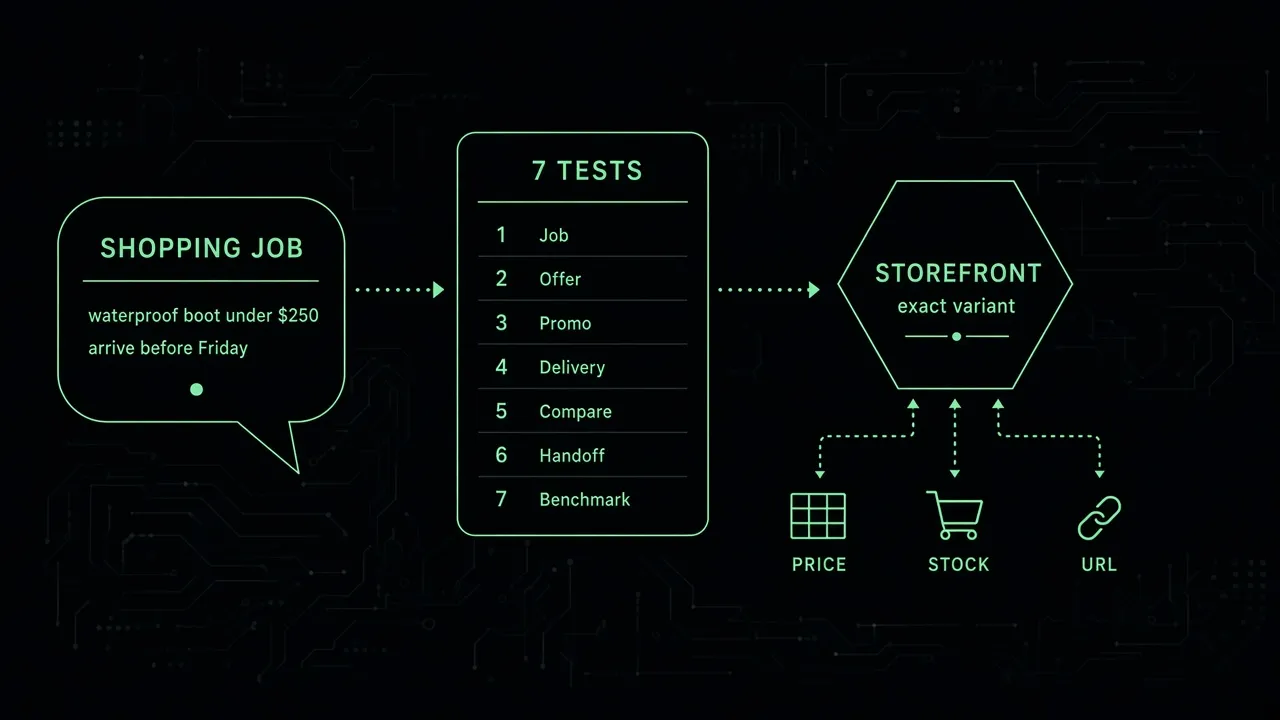
The fastest way to find out is to test the journey now. Run these seven checks against the products, promotions, and policies that will matter during the holiday period.
1. Start with the shopper’s job, not a product title
A catalog can look perfectly searchable when the input is a product name. Holiday shopping rarely begins there.
Use a short set of realistic prompts that combine purpose and constraints. For example:
- “A waterproof boot for Iceland in October under $250”
- “A practical gift for a parent who runs in the dark”
- “A carry-on bag that fits a 15-inch laptop and can arrive before Christmas”
Then ask a simple question: do the results reflect the job, or did the system merely match a few words on a page?
A useful discovery layer needs to recognize the category, budget, timing, use case, and important attributes in a natural-language request. SuggestAPI is designed to turn that context into structured filters and ranking signals for the search engine a merchant already uses, rather than replacing that search stack. [2]
2. Check the offer, not only the parent product
An assistant should not recommend a product simply because the parent page exists. It needs to know whether the specific offer is viable: the size, color, configuration, price, and stock state the shopper asked for.
This is where holiday journeys often break. The result looks right until the shopper opens the page and discovers the chosen size is unavailable, the sale price does not apply, or the delivery window has closed.
Pick ten priority products and query them using a constraint that depends on a variant. If someone asks for a black, size-11 hiking boot, your result should identify a qualifying option—not a broad product family with an asterisk attached. Current price, availability, image, canonical URL, product identifier, and decision-driving attributes should travel with the result.
3. Make promotion details readable as data
A banner that says “Up to 30% off” may be enough to catch a person’s eye. It is not enough for a system that needs to answer whether a specific item is discounted today or whether the promotion ends tonight.
For priority products, make the promotional facts clear and current: regular price, current price, promotion start and end dates, eligible variants, exclusions, and any minimum-order rule. Do the same for free-shipping thresholds, gift-with-purchase conditions, and returns exceptions.
The point is not to publish every internal pricing rule. It is to ensure an assistant can base a recommendation on the same visible commercial facts a shopper will see after clicking through.
4. Put holiday delivery answers close to the product decision
During the holiday period, “Will it arrive in time?” is often more important than “Is it available?” A product that is technically in stock but cannot reach the shopper when needed is not a good recommendation.
Test the information an assistant would need to answer a delivery question: cutoff dates, fulfillment lead time, regional restrictions, pickup availability, preorder status, and return windows. If the answer lives only in a rotating announcement bar or a support article that does not connect to a result, the shopper still has to do the detective work.
Not every delivery estimate belongs in catalog search. But the conditions that regularly change a buying decision should be available in the discovery flow, either as structured product information or as a retrievable policy.
5. Test comparison as a conversation, not a list of links
Many holiday requests are comparisons in disguise. “Which one is better for a small apartment?” and “What is the difference between the standard and pro model?” are requests for a recommendation with reasons.
Choose two products that are commonly confused and ask the kinds of questions support or store teams hear every day. A good result should surface the relevant trade-off—price, size, compatibility, material, capacity, or availability—without pretending the products are interchangeable.
SuggestAPI’s Agent Gateway exposes catalog search, recommendations, comparison, and product lookup to connected agents through MCP and WebMCP. The aim is not to have an assistant invent product advice from a marketing page. It is to let it work from current catalog objects and explain the comparison with the attributes that matter. [2]
6. Follow the handoff all the way into your storefront
A correct recommendation is only half the journey. The next click should land the shopper on the right product page, with a clear path to buy the option that was discussed.
Run each holiday test in a clean browser session. Confirm that the returned URL resolves, the product still exists, the selected variant is available where applicable, and the path to cart is clear. Pay attention to mobile. Adobe expects mobile to account for a record 63% of Thanksgiving online spend this year. [1]
The handoff should preserve the merchant’s role. SuggestAPI layers discovery in front of an existing catalog and search backend; the merchant keeps the storefront, cart, checkout, policies, and customer relationship. [2]
7. Build a short benchmark before demand peaks
Do not wait for a generic traffic dashboard to tell you whether discovery worked. Create a small benchmark of unbranded, high-intent prompts for the categories you expect to matter most. Include gift ideas, product comparisons, budget limits, variant constraints, and delivery questions.
Run the same prompts regularly through the experiences you operate and the assistants you want to support. Record whether the response found a relevant product, selected a buyable variant, used current pricing and availability, made a sensible comparison, and handed the shopper to a usable page.
The useful output is not a vanity score. It is a list of concrete misses: terms that return nothing, attributes that are not indexed, promotions that are unclear, and handoffs that force the shopper to start over. Those are improvements a commerce, product, and engineering team can make quickly.
The practical goal for the next few weeks
You do not need to replatform search before the holiday season. Start by making a representative set of products dependable for the questions shoppers are already asking. Connect the live catalog. Keep variants and offers current. Make important policies retrievable. Test the route back to the storefront.
The stronger the connection between a shopper’s request and your live product data, the less an assistant has to guess. That is what makes discovery useful during a high-stakes season: people find products they can actually buy, and merchants keep the purchase on the storefront they control.
SuggestAPI adds intent-aware discovery and agent-ready catalog access in front of the search infrastructure you already run, including Algolia, Typesense, Elasticsearch, Meilisearch, and Shopify. It helps shoppers, apps, and AI agents search, compare, and receive current product information while the underlying catalog and checkout stay in the merchant’s control. [2]