

Catalog source
Your Supabase rows stay put. Your catalog becomes easy to discover.
What can I do?
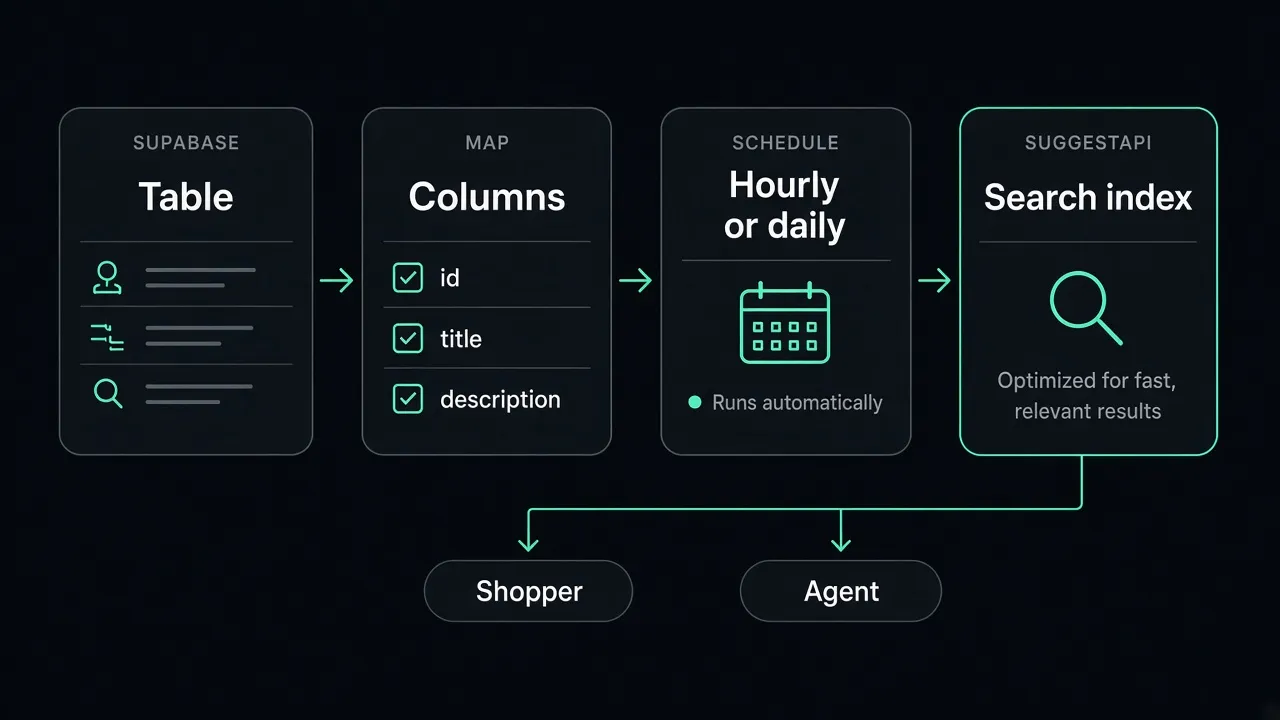
Connect a Supabase project, choose the database table or view that holds your product records, and map the fields SuggestAPI needs for discovery. SuggestAPI pulls those rows into a search index built for shoppers and agents—while Supabase remains the system of record.
What stays where?
Supabase remains the system of record. The table or view stays where it is.
How does data move?
- Supabase table or view
- Mapped fields
- Scheduled sync
- SuggestAPI index
- Shoppers + agents
Search runs against the SuggestAPI index, not against Postgres on every keystroke. If your source includes updated_at, scheduled runs sync changed rows; otherwise the next run pulls the table again. Removed source IDs are pruned from the index.
What do I do first?
Connect Supabase01
Connect the project
Connect the Supabase project from Integrations. SuggestAPI reads it. It does not become your database.
02
Choose the table or view
Choose the database, schema, and table or view that holds the product records.
03
Map ID, title, description, and manufacturer
Point id at the row key. Map title, description, and manufacturer when those columns exist.
04
Choose manual, hourly, or daily sync
Send the mapped rows into a SuggestAPI index on that schedule.