

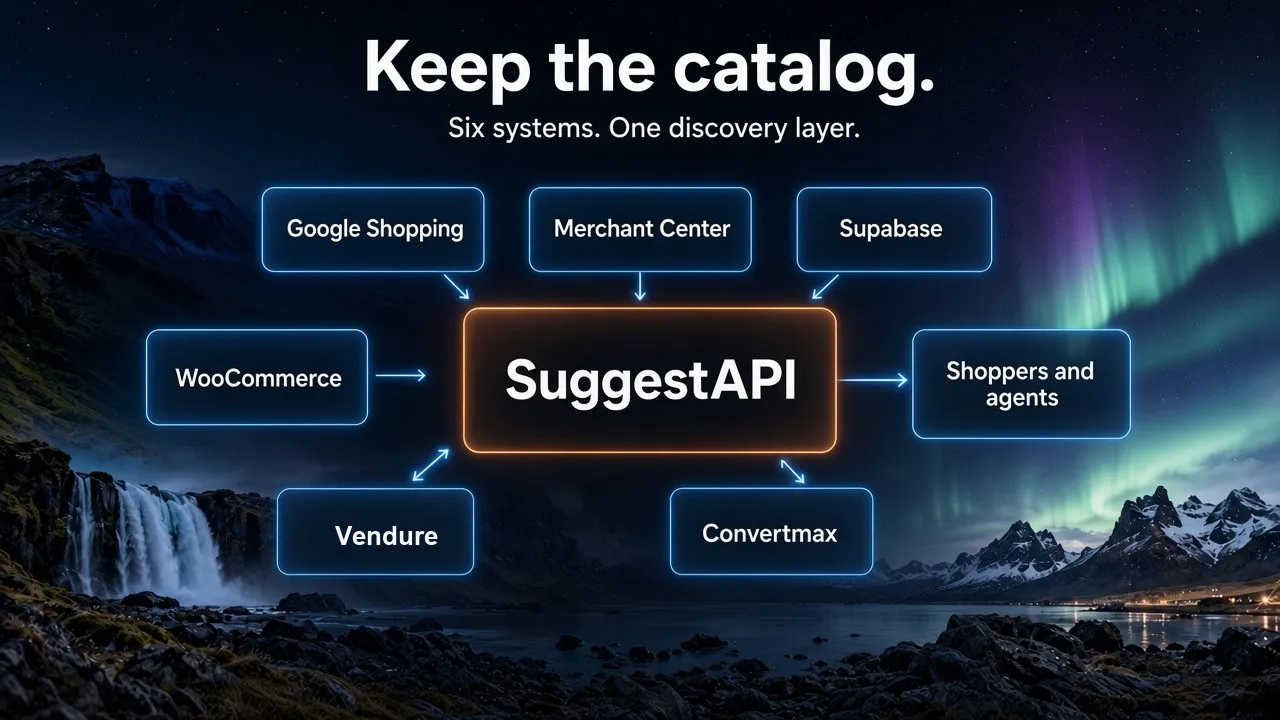
Summary. SuggestAPI ships six first-party integrations: Google Shopping feed import, Google Merchant Center export, Supabase, WooCommerce, Vendure, and Convertmax.
The integrations page exists because of one argument: you shouldn't have to move your catalog to make it discoverable.
Every integration on that page follows the same rule. SuggestAPI sits in front of the system that already owns your products. It holds the shopper's intent while they refine it, then hands results back in one shape, for people and agents alike. Nothing underneath gets replaced.
Six integrations are live today. They fall into a few natural groups, and the group tends to tell you whether you need one.
Feeds in and out of your index
If your catalog already exists as a feed somewhere, start here. Both directions are covered.
Google Shopping Feed Import
A scheduled CSV pull. Nobody wants to build a custom importer for a feed they already maintain, so you point SuggestAPI at the Google Shopping CSV and it pulls rows into an index on a schedule.
The API path is POST /v1/indexes/{index_id}/import/google-shopping. In the console it sits with the other import options, next to file upload and crawl.
Good starting point when your product data is already clean enough to publish to Google. It's almost certainly clean enough to search.
Google Merchant Center Export
Same catalog, opposite direction. Every ownership-verified domain gets a public feed URL:
https://feed.suggestapi.com/{domain}/Copy that into Google Merchant Center as a scheduled RSS/XML feed. Then set a fetch interval that matches how often your catalog really changes. The feed caches for up to 24 hours, so new products appear after Google's next fetch, not instantly.
Three things have to be true before a feed URL shows up at all:
- The domain is a normalized hostname, like
shop.example.com - Ownership is verified in SuggestAPI
- The domain is linked to an index holding your catalog
The mapping is strict about quality. Items missing a required attribute get left out of the feed rather than published half-formed, so Google always receives something well-formed. SuggestAPI maps id, title, description, link, image_link, availability, and price from your index, then adds brand, gtin, mpn, condition, sale price, variants, and custom labels when those fields exist.
Both directions get more depth in the Google Shopping feed guide.
Catalog sources: Supabase
Plenty of teams keep their product records in a database table nobody ever intended to turn into a search index. Supabase is the first source of that kind to get a first-party path.
Linking it takes four steps. Connect the project. Pick the database, schema, and table or view. Map the columns. Choose a cadence: manual, hourly, or daily. Point id at the row key, and map title, description, and manufacturer where those columns exist.
What the sync does and doesn't do is worth being precise about:
- Rows stay in Supabase. SuggestAPI reads them. It doesn't become your database.
- If the table has an
updated_atcolumn, only changed rows sync. Without one, each run pulls the whole table again. - Every run compares source IDs and prunes index documents whose rows are gone.
So: a scheduled pull, not a live query against Postgres on every keystroke, and not change data capture. Search runs against the index. Supabase stays the source of truth for the rows.
Storefronts: WooCommerce
The WooCommerce path is the WordPress plugin, and it's in the WordPress Plugin Directory now. We wrote up the install path in SuggestAPI for WordPress + WooCommerce.
You get a search box anywhere on the site through the [suggestapi_search] shortcode, or you let the plugin place one above the shop grid at /shop/. Requests route through a server-side proxy, so a public search key can power storefront search without a private write key sitting in the browser.
The part that matters more over time is the sync. Products created, updated, deleted, or moving in and out of stock queue catalog updates in the background, and variable products sync at the variation level, which keeps a specific size or color from getting left behind. It runs on WooCommerce's Action Scheduler, with WP-Cron as a fallback. The first full reindex reports progress, retries with backoff, and writes to an error log.
Terminal people get WP-CLI commands:
wp suggestapi status
wp suggestapi test-connection
wp suggestapi reindex
wp suggestapi index-product
Stores on a registered agent tenant can also switch on an ai-catalog link tag, which points AI shopping agents at the catalog through the SuggestAPI agent gateway. Optional. Off by default.
Commerce platforms: Vendure
Vendure keeps the catalog and the checkout. SuggestAPI sits in front for shopper and agent discovery.
That's the whole idea, and it's a different shape of integration than the others. Nothing to migrate. No second source of truth. Vendure stays the platform, and discovery becomes a layer that can serve a search bar, an app, and an agent from the same catalog.
Revenue: Convertmax
Search analytics usually stop at the click. Convertmax is the integration that picks up after it.
SuggestAPI emits the discovery side: what people and agents searched, what they refined toward, what they clicked, what failed. Convertmax holds the revenue side: acquisition source, customer journeys, conversions, orders, revenue, LTV, and marketing ROI. Together, internal search stops being a dark funnel.
The practical questions this opens up are the ones search reports have never answered well:
- Which campaigns generate searches for our highest-margin products?
- Which products do people hunt for and fail to find?
- Which search terms actually produce revenue?
- Which agent sessions converted, and what did they run before that?
That last one is the newer problem. Traffic from ChatGPT tells you very little on its own. Knowing what the agent searched, which products it recommended, and whether the session ended in an order tells you something you can act on.
The systems underneath, which are a different list
Worth separating real integrations from things SuggestAPI just works with, because the marketing pages blur them together.
Search engines. Algolia, Typesense, Elasticsearch, and Meilisearch are supported backends, not integrations you install. Adapter routing is configured per index, so you point a SuggestAPI index slug at one backend and an upstream index name. Backend credentials live in SuggestAPI and get injected server-side, which keeps them out of client bundles and agent manifests. Moving a staging index from Typesense to Algolia is a routing change, not a code change.
Webhooks and Sheets. Webhook flows exist for Shopify, WooCommerce, and HubSpot, for near real-time product and content updates. Google Sheets connects with OAuth and a scheduled sync, which is the path operators and marketers tend to prefer when they want to own the content themselves.
Protocols. MCP, WebMCP, A2A, UCP, ACP, PAP, OKF, ARD, and HTTP QUERY are agent and commerce surfaces rather than integrations. They're documented on the supported protocols page, which is the better place to start if your question is "can our agent call this" instead of "how does our catalog get in."
Which one do you need?
The category heading on the integrations page usually answers this before you finish the description.
| If your catalog lives in... | Start with |
|---|---|
| A Google Shopping CSV you already maintain | Google Shopping Feed Import |
| Google Merchant Center | Google Merchant Center Export |
| A Supabase table | The Supabase integration |
| WooCommerce | The WordPress plugin |
| Vendure | The Vendure integration path |
| Algolia, Typesense, Elasticsearch, or Meilisearch | Bring Your Own Search, routed per index |
One thing about ordering. If your goal is AI visibility, the export is what touches Google's Shopping Graph. If your goal is on-site search quality, the import or the storefront integration does the work. And if you can't yet say which demand turned into revenue, that's a Convertmax question, not a search one.
The integrations page is the current list, and new adapters land on For your stack as they ship. If the system you run isn't on either page, the adapter model is the reason the answer is usually still yes.